
Setup a Chromatic workflow
Create the workflow file
To set up a GitHub Actions Chromatic workflow for a project, first, create a chromatic.yml file inside the .github/workflows folder at the root of the solution's workspace:
workspace
├── .github
├──── workflows
├────── chromatic.yml
├── package.json
Then, open the newly created file and copy/paste the following content:
name: Chromatic

# PNPM setup based on https://github.com/pnpm/action-setup#use-cache-to-reduce-installation-time.

on:
  push:
    branches:
      - main
  pull_request:
    branches:
      - main
    types:
      - opened
      # To conditionally execute the workflow based on a PR label.
      - labeled
  workflow_dispatch:

env:
  CI: true

concurrency:
  group: chromatic-${{ github.ref }}
  cancel-in-progress: true

jobs:
  chromatic:
    runs-on: ubuntu-latest

    permissions:
      pull-requests: write

    steps:
      - name: Early exit if "run chromatic" label is not present
        if: github.event_name == 'pull_request' && !contains(github.event.pull_request.labels.*.name, 'run chromatic')
        run: |
          echo "No \"run chromatic\" label present. Skipping Chromatic workflow."
          exit 1

      - name: Checkout
        uses: actions/checkout@v6
        with:
          fetch-depth: 0
          # Refer to: https://www.chromatic.com/docs/github-actions/#recommended-configuration-for-build-events.
          ref: ${{ github.event.pull_request.head.ref }}
        env:
          # Refer to: https://www.chromatic.com/docs/github-actions/#recommended-configuration-for-build-events.
          CHROMATIC_BRANCH: ${{ github.event.pull_request.head.ref || github.ref_name }}
          CHROMATIC_SHA: ${{ github.event.pull_request.head.sha || github.ref }}
          CHROMATIC_SLUG: ${{ github.repository }}

      - name: Install pnpm
        uses: pnpm/action-setup@v4
        with:
          run_install: false

      - name: Install Node.js
        uses: actions/setup-node@v6
        with:
          node-version: '>=24.0.0'
          check-latest: true
          cache: pnpm
          cache-dependency-path: pnpm-lock.yaml

      - name: Install dependencies
        run: pnpm install --frozen-lockfile

      - name: Chromatic
        uses: chromaui/action@latest
        with:
          projectToken: ${{ secrets.CHROMATIC_PROJECT_TOKEN }}
          onlyChanged: true
          exitOnceUploaded: true
          autoAcceptChanges: main

      - name: Remove "run chromatic" label after Chromatic completion
        if: github.event_name == 'pull_request'
        uses: actions/github-script@v8
        with:
          script: |
            github.rest.issues.removeLabel({
                owner: context.repo.owner,
                repo: context.repo.repo,
                issue_number: context.issue.number,
                name: 'run chromatic'
            });
Create a label
Next, since the workflow runs only when the run chromatic label is present on the pull request. Refer to the GitHub documentation to create a label named run chromatic.
Add a required status check
Finally, because the workflow only runs when the run chromatic label is present on the pull request, it is important to make the Chromatic workflow a required status check. This ensures reviewers are reminded to run Chromatic before merging.
To do so, add a required status check for the chromatic job on the default branch ruleset:
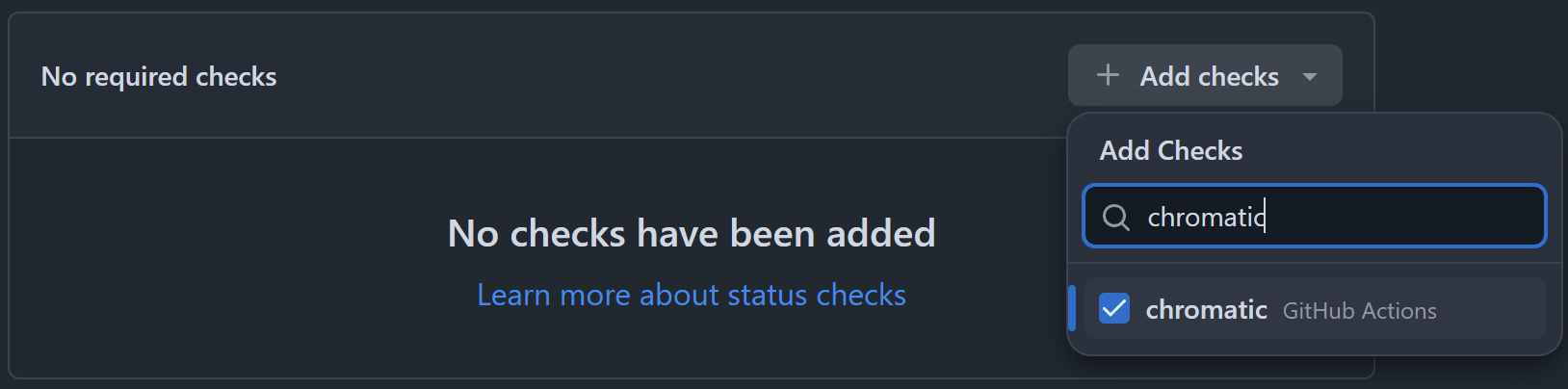
When adding a required status check, search for the job name, not the workflow name.
Renovate bot and Changesets
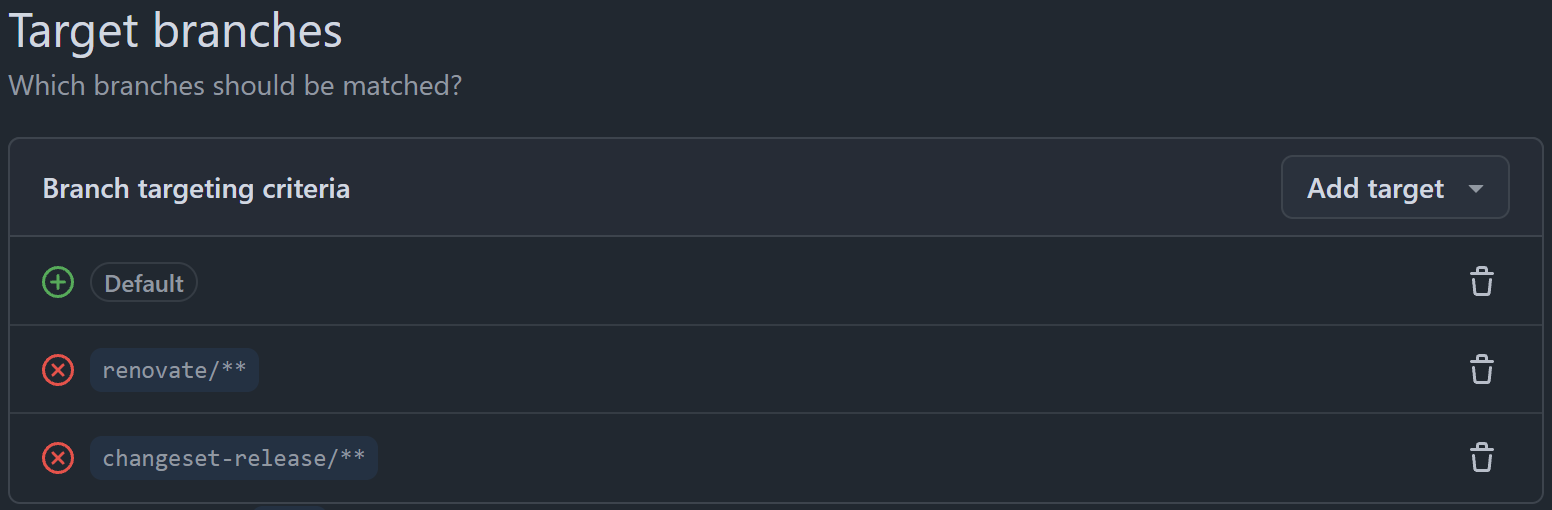
If the repository uses Renovate bot or Changesets automation tools, consider excluding the branches they create from the default branch ruleset:
Try it 🚀
To test your new CI workflow:
- Create a pull request in GitHub and confirm that the Chromatic workflow fails.
- Add a
run chromaticlabel to the PR. - Confirm that the Chromatic workflow runs successfully.