# Setup Honeycomb
Squide integrates with [@workleap/telemetry](https://www.npmjs.com/package/@workleap/telemetry) v2 or later (or [@workleap/honeycomb](https://www.npmjs.com/package/@workleap/honeycomb) v7 or later) to automatically send performance traces for the bootstrapping flow of an application.
## Install the packages
To set up Honeycomb, first, open a terminal at the root of the host application and install the following packages:
```bash
pnpm add @workleap/telemetry @opentelemetry/api
```
## Register the instrumentation
Then, refer to the [create an host application](../introduction/create-host.md) guide as a starting point and update the host application bootstrapping code to register Honeycomb instrumentation:
```tsx !#7-16,20
import { FireflyProvider, initializeFirefly } from "@squide/firefly";
import { initializeTelemetry } from "@workleap/telemetry/react";
import { createRoot } from "react-dom/client";
import { App } from "./App.tsx";
import { registerHost } from "./register.tsx";
const telemetryClient = initializeTelemetry({
honeycomb: {
namespace: "sample",
serviceName: "squide-sample",
apiServiceUrls: [/.+/g,],
options: {
proxy: "https://my-proxy.com"
}
}
});
const runtime = initializeFirefly({
localModules: [registerHost],
honeycombInstrumentationClient: telemetryClient.honeycomb
});
const root = createRoot(document.getElementById("root")!);
root.render(
);
```
!!!tip
For additional information about this Honeycomb instrumentation setup, refer to the `@workleap/telemetry` library [documentation](https://workleap.github.io/wl-telemetry).
!!!
!!!warning
Avoid using `/.+/g,` in production, as it could expose customer data to third parties. Instead, ensure you specify values that accurately matches your application's backend URLs.
!!!
!!!warning
We recommend using an [OpenTelemetry collector](https://docs.honeycomb.io/send-data/opentelemetry/collector/) over an ingestion [API key](https://docs.honeycomb.io/get-started/configure/environments/manage-api-keys/#create-api-key), as API keys can expose Workleap to potential attacks. To use a collector, set the `proxy` option with your collector's proxy address.
!!!
## Default instrumentation
With instrumentation in place, a few default traces are now available :point_down:
### Bootstrapping flow
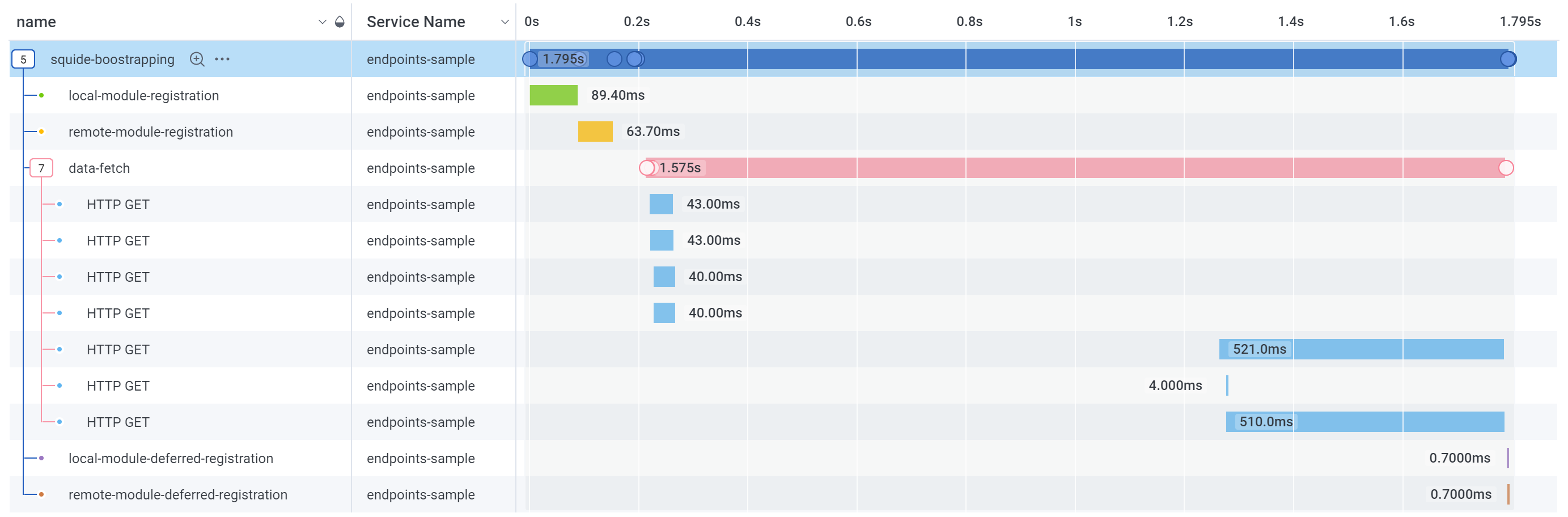
The performance of an application bootstrapping flow can now be monitored:
:::align-image-left
:::
### Deferred registration update
When a deferred registration is updated, the performance of the operation can be monitored:
:::align-image-left

:::
### Fetch requests
Individual fetch request performance can be monitored from end to end:
:::align-image-left

:::
### Document load
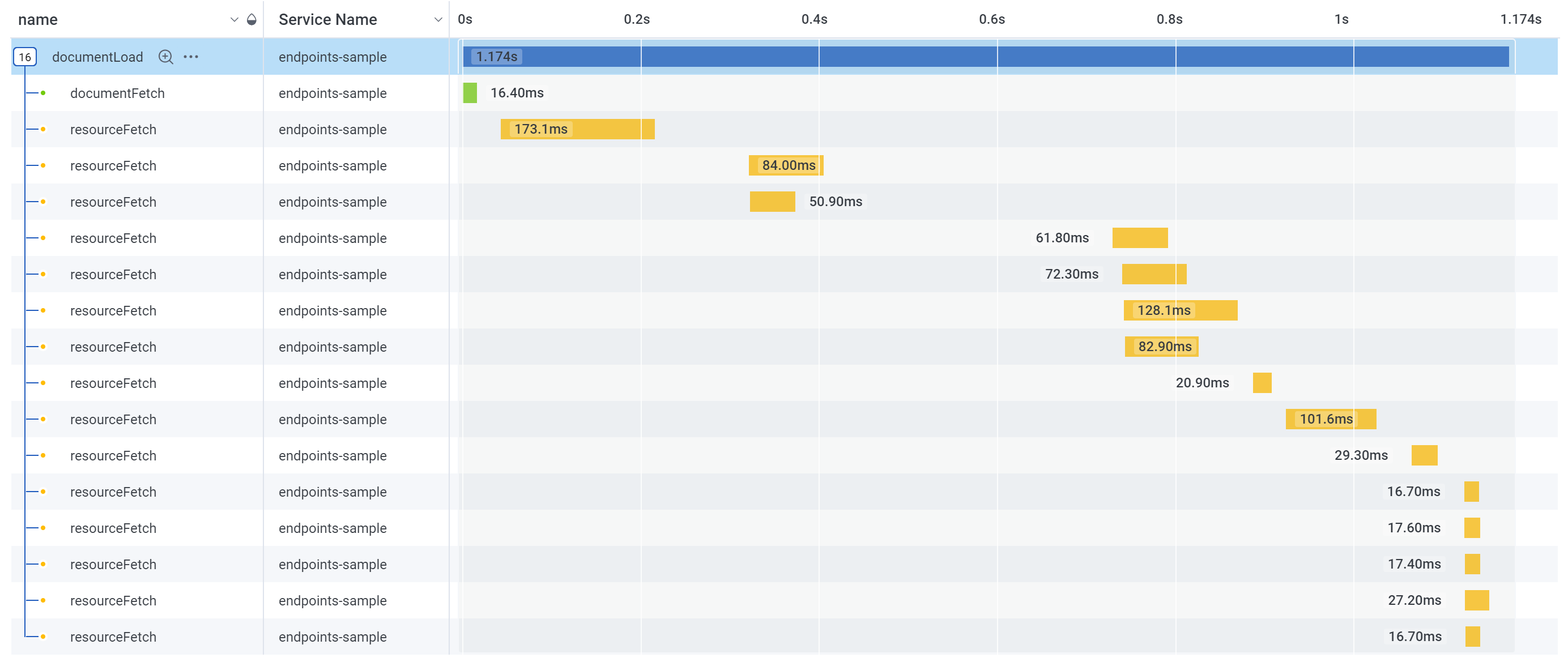
The loading performance of the DOM can be monitored:
:::align-image-left
:::
### Unmanaged error
When an unmanaged error occurs, it's automatically recorded:
:::align-image-left

:::
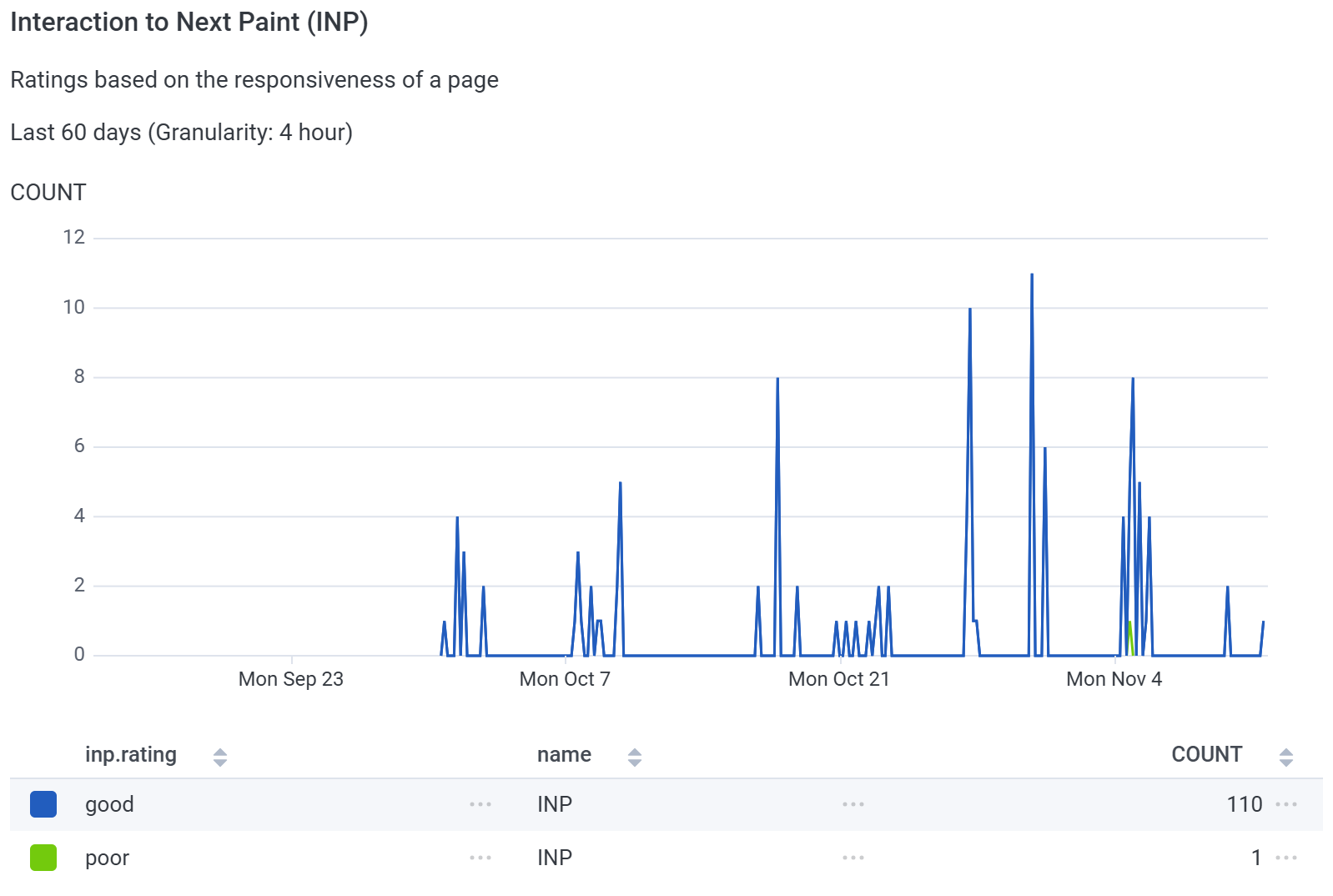
### Real User Monitoring (RUM)
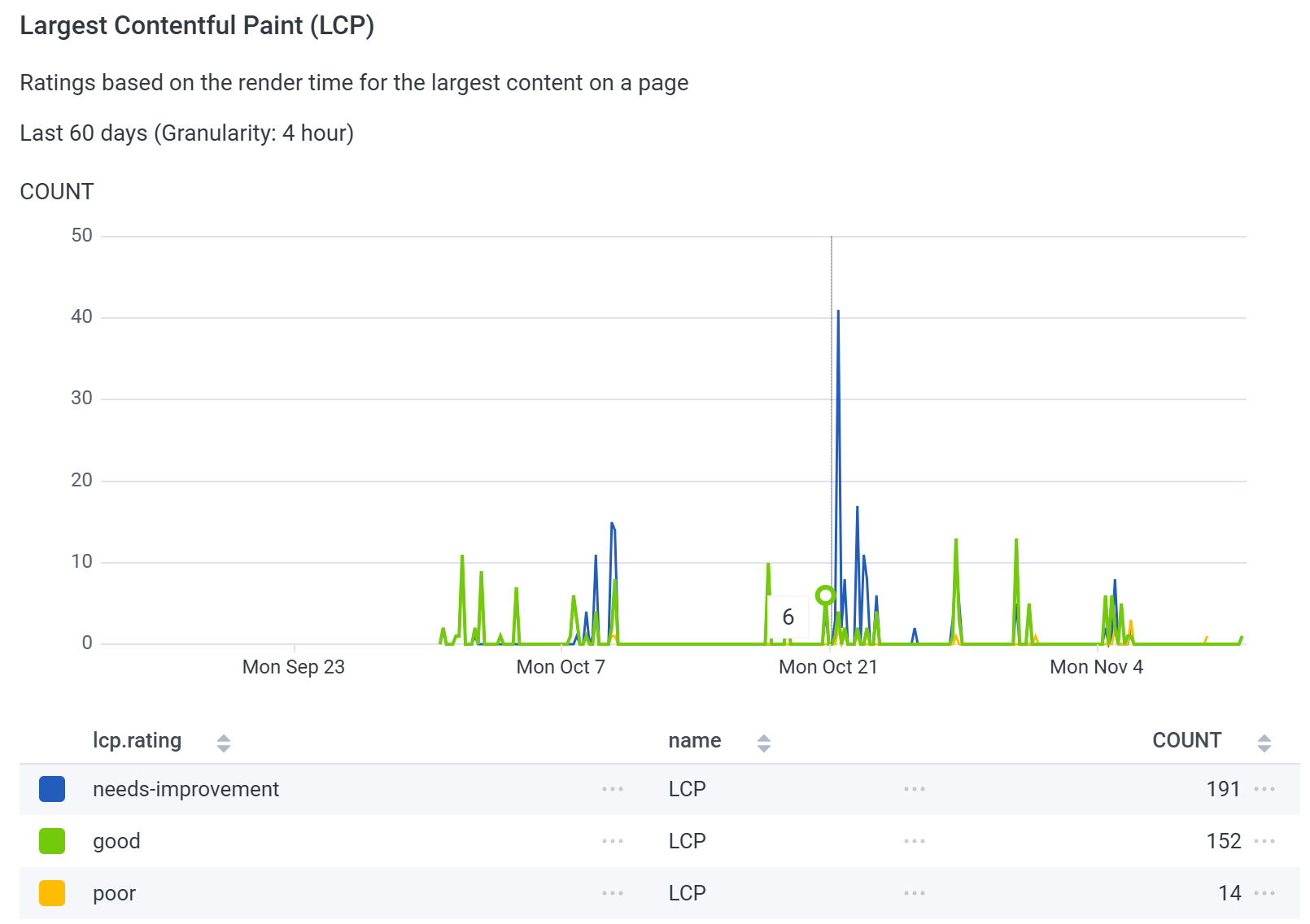
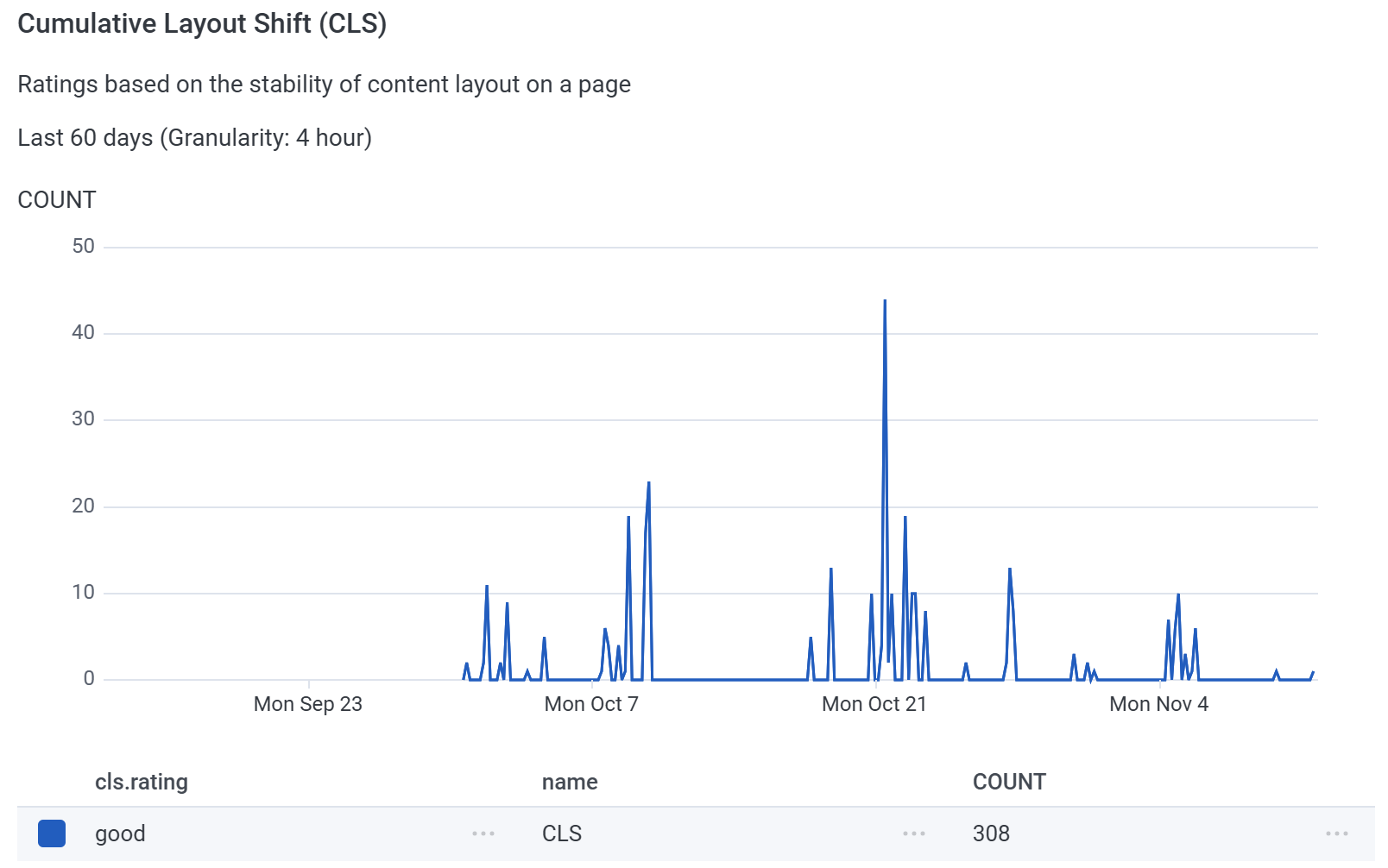
The default instrumentation will automatically track the appropriate metrics to display RUM information:
:::align-image-left
{width=536 height=378}
:::
:::align-image-left
{width=536 height=378}
:::
:::align-image-left
{width=532 height=358}
:::
## Set custom user attributes
Refer to the [set Honeycomb custom attributes](../essentials/set-honeycomb-custom-attributes.md) essential page.
## Custom traces
To send custom traces to Honeycomb, applications should use the [OpenTelemetry API](https://docs.honeycomb.io/send-data/javascript-browser/honeycomb-distribution/#add-custom-instrumentation) directly:
```tsx !#4,9-10
import { useEffect } from "react";
import { trace } from "@opentelemetry/api";
const tracer = trace.getTracer("my-tracer");
export function Page() {
useEffect(() => {
// OK, this is a pretty bad example.
const span = tracer.startSpan("my-span");
span.end();
}, []);
return (
Hello from a page!
);
}
```
## Try it :rocket:
Start the application in a development environment using the `dev` script. Render a page, then navigate to your Honeycomb instance. Go to the `Query` page and type `root.name = squide-bootstrapping` into the `Where` input. Run the query, select the `Traces` tab at the bottom of the page and view the detail of a trace. You should view the performance of your application bootstrapping flow.
### Troubleshoot issues
If you are experiencing issues with this guide:
- Set the [initializeTelemetry](https://workleap.github.io/wl-telemetry/reference/telemetry/initializetelemetry/) function `verbose` option to `true`.
- Open the [DevTools](https://developer.chrome.com/docs/devtools/) console. You'll see a log entry for every for each dispatched event, along with multiple console outputs from Honeycomb's SDK. Squide's bootstrapping instrumentation listens to events to send Honeycomb traces. Most events should match an Honeycomb trace and vice versa.
- `[squide] Honeycomb instrumentation is registered`
- `[squide] Dispatching event "squide-local-modules-registration-completed"`
- `[squide] Dispatching event "squide-remote-modules-registration-completed"`
- `[squide] Dispatching event "squide-public-data-fetch-started"`
- `[squide] Dispatching event "squide-public-data-ready"`
- `@honeycombio/opentelemetry-web: Honeycomb link: ...`
- Refer to a working example on [GitHub](https://github.com/workleap/wl-squide/tree/main/samples/endpoints).
- Refer to the [troubleshooting](../troubleshooting.md) page.